

Bluetooth headphones, wireless earbuds, portable speakers, and car audio systems have become essential accessories for everyday Android users. They make it easier to listen to music, attend calls, enjoy videos, and manage audio without connecting cables. However, switching between multiple Bluetooth devices can sometimes involve opening Settings, locating a paired device, and manually adjusting connection options.
Bluetooth Audio Connect Widget MOD APK is a search term used by Android users looking for a convenient way to manage Bluetooth audio connections from their home screen, potentially with additional features or fewer restrictions. Before downloading a modified APK, it is important to understand what the original application offers, which features depend on device compatibility, and what security risks modified applications may introduce.
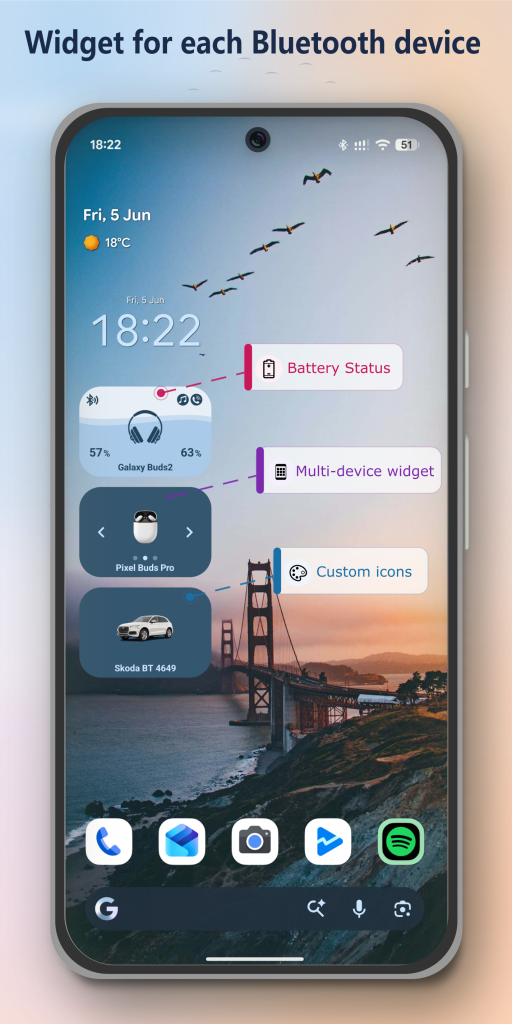
Bluetooth Audio Connect Widget, developed by Tomas Hadraba, is an Android utility designed to simplify connections to headphones, earbuds, speakers, soundbars, and compatible hands-free devices. Its official Google Play listing describes home-screen widgets, Bluetooth profile controls, battery information for supported devices, customization options, and other audio-management features.
At APKMarty.com, this guide explores the app’s functionality, the meaning of the MOD APK label, installation considerations, compatibility, and practical safety measures. The goal is to help users make an informed decision rather than assume that every modified version contains the same features or is safe to install.
What Is Bluetooth Audio Connect Widget?
Bluetooth Audio Connect Widget is an Android utility that provides shortcuts for managing previously paired Bluetooth audio devices. Instead of navigating through several system menus whenever you want to connect your headphones or speaker, you can use a home-screen widget to access supported connection controls.
The app supports compatible audio devices using Bluetooth profiles such as A2DP for media audio and Headset for call-related audio. Depending on the device and Android version, users may be able to connect or disconnect devices, select an active audio device, and manage supported audio profiles.
It is particularly useful for people who regularly switch between wireless earbuds, a home speaker, and their car’s hands-free system. The application does not replace Bluetooth hardware or guarantee better sound quality; it provides a more convenient interface for managing compatible connections.
Why Do Users Search for Bluetooth Audio Connect Widget MOD APK?
People searching for Bluetooth Audio Connect Widget MOD APK may be looking for a modified edition with fewer advertisements, unlocked customization options, or access to features that otherwise require payment. However, these are possible motivations behind the search term, not verified features of a particular modified package.
There is no universal MOD APK version. Different websites may distribute different files, and their descriptions may not accurately reflect the contents of the downloaded application.
Features of Bluetooth Audio Connect Widget
One-Tap Bluetooth Connections
One of the main advantages of the application is its home-screen widget. Users can create shortcuts for individual paired devices or use a widget that lists multiple Bluetooth devices.
For example, someone who alternates between wireless earbuds during a commute and a speaker at home can keep their preferred devices accessible from the home screen. This reduces the need to repeatedly navigate through Android’s Bluetooth settings.
Actual connection behavior still depends on the accessory, its current connection state, and the Android device.
Bluetooth Audio Profile Management
A Bluetooth connection can support different functions, including music playback and phone calls. The application provides controls for supported profiles, helping users manage how compatible accessories connect to their phones.
The A2DP profile is associated with media audio, while the Headset profile supports relevant hands-free and call functionality. The available controls can differ across accessories and operating-system versions.
This is especially helpful when troubleshooting a headset that connects successfully but does not play music or route calls as expected.
Switching Between Audio Devices
Android users often keep several Bluetooth accessories paired with one phone. A dedicated widget can make it easier to choose the intended output device when moving between headphones, speakers, and car audio.
The app provides supported active-device selection and connection controls. It does not guarantee that every accessory will connect instantly, and some devices may automatically reconnect to another previously paired phone or computer.
Battery Status for Compatible Earbuds
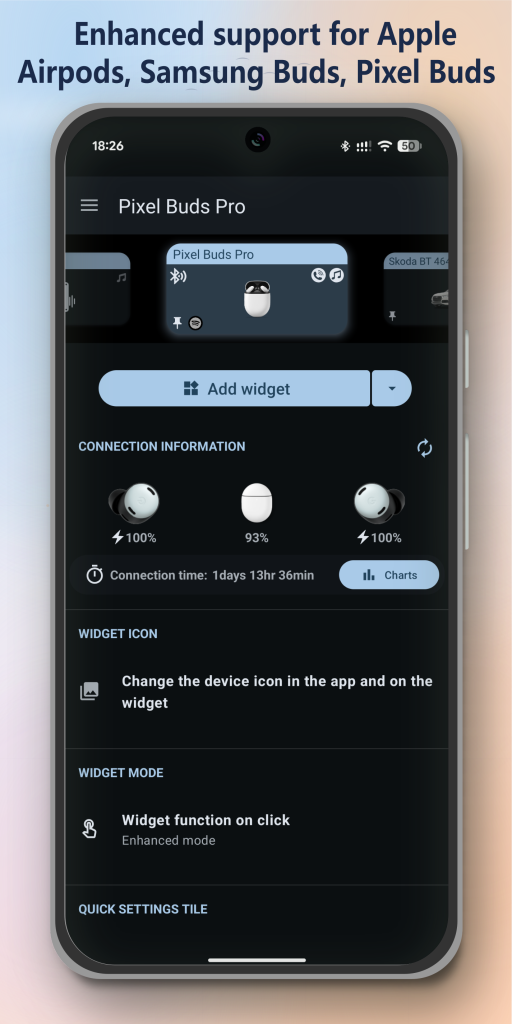
Battery monitoring is another useful feature. Where supported by the accessory and Android system, the app can display Bluetooth headphone battery information.
The developer also documents enhanced battery reporting for selected true wireless stereo earbuds, including compatible Google Pixel earbuds, Apple AirPods, and Samsung Galaxy Buds models.
Battery reporting is not universal. Some accessories expose limited information, and the accuracy or availability of individual earbud and charging-case readings depends on the device.
Widget Customization
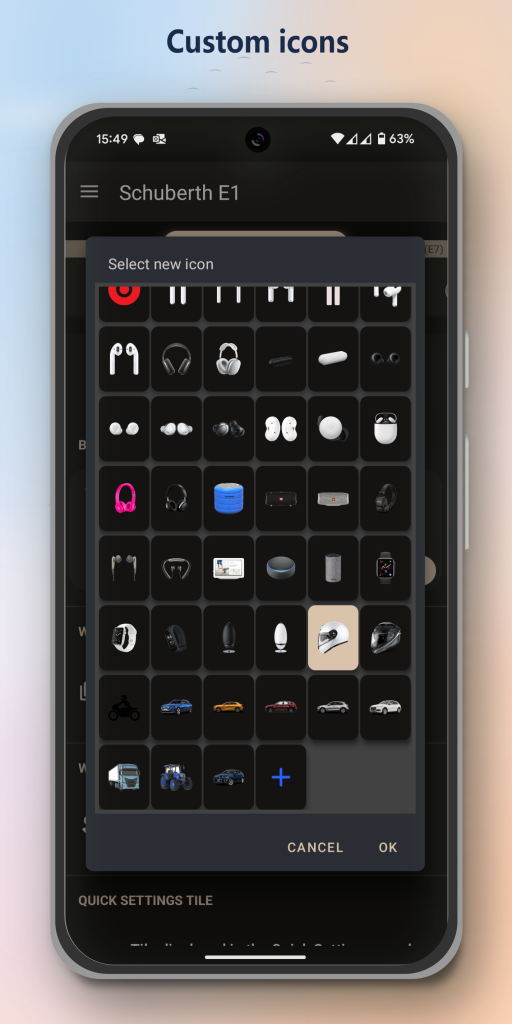
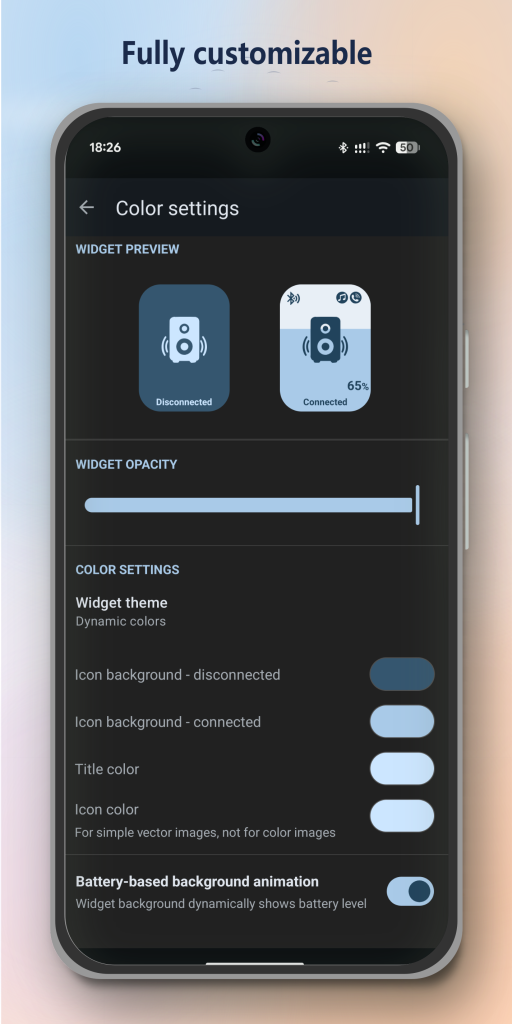
The original application includes options for customizing widget size, colors, margins, icons, and transparency. This allows users to create a home-screen shortcut that fits their preferred Android layout.
On supported Android 12 and later devices, the app also documents dynamic color support based on the wallpaper.
Customization options available in a particular edition may vary. Do not assume a MOD APK unlocks premium appearance settings unless the specific package and its changes have been independently verified.
Audio Codec Information
For compatible devices and Android versions, the application can display information about the Bluetooth audio codec in use. The official listing describes codec viewing and changing options on Android 15, subject to device support.
Codecs such as SBC and aptX have different compatibility and audio characteristics. However, the presence of a codec option does not mean every phone and headset supports every codec.
Audio quality also depends on the connected accessories, the selected codec, connection conditions, and the source audio.
Notifications and Volume Controls
The original app offers additional conveniences, including connection and disconnection notifications, saved-volume restoration, a Quick Settings tile, and playback-resume functionality for supported use cases.
These features may reduce repetitive actions when using Bluetooth accessories throughout the day. Some behavior depends on Android background restrictions, application settings, and compatibility with the media player.
The app’s official listing identifies Spotify as a supported playback-resume use case. Other media applications may behave differently.
Compatibility and Android Permissions
Compatibility depends on the APK’s Android requirements, the phone’s operating-system version, and the connected accessory. A feature available on one Android phone may be unavailable on another.
Android 12 and later introduced separate runtime permissions for Bluetooth scanning, advertising, and connecting to nearby devices. Applications that communicate with already-paired accessories may need Bluetooth connection permission, while scanning for nearby devices can require a different permission.
When reviewing an app’s permissions, focus on whether each request makes sense for its advertised function. Bluetooth access is expected for a Bluetooth management utility, but unrelated requests deserve closer scrutiny.
Guide: Download And Install Bluetooth Audio Connect Widget MOD APK
Before downloading an APK, decide whether you need the original app or are considering a modified package. The safest recommendation is to install the official version through Google Play whenever it is available for your device.
How to Download the Original App
- Open the official site and the Play Store.
- Check the developer name and application details.
- Review the requested permissions and available privacy information.
- Tap Install if the app is compatible with your device.
- Open the application and follow its setup instructions
Conclusion
Bluetooth Audio Connect Widget is a practical Android utility for people who regularly switch between wireless headphones, earbuds, speakers, soundbars, and car audio systems. Its home-screen widgets, supported Bluetooth profile controls, battery monitoring, and customization features can make everyday audio management more convenient.
Although searches for Bluetooth Audio Connect Widget MOD APK may focus on modified or premium features, those claims should be evaluated carefully. Not every modified package offers the advertised changes, and downloading an altered APK introduces additional security considerations.
For most Android users, the original application from Google Play is the recommended starting point. Check compatibility, understand the permissions, and use trusted installation sources to keep your device safer.
FAQs
Does Bluetooth Audio Connect Widget support Bluetooth speakers?
Yes. The original application supports compatible Bluetooth audio devices, including portable speakers and soundbars. You must pair the device with your Android phone, and the available audio profiles depend on the accessory.
Can I see my earbuds’ battery percentage?
The app can display battery information for supported accessories. Enhanced reporting is available for selected compatible earbuds, but not every Bluetooth headset exposes battery information to Android.
Is it safe to install a modified APK?
There is no universal safety guarantee for modified APKs. Altered packages may contain malicious code, unwanted advertisements, or unexpected permission requests. The official version is generally the safer choice, and Google Play Protect should remain enabled.
Why is my Bluetooth widget not connecting to my headphones?
Check that Bluetooth is enabled, the headphones are paired, and they are not connected to another device. Then review the app’s Bluetooth permissions and Android audio settings. Restarting Bluetooth or reconnecting the accessory may resolve the issue.
Does Bluetooth Audio Connect Widget improve sound quality?
Not directly. The app primarily simplifies Bluetooth connection and audio-profile management. Sound quality depends on your headphones, supported codecs, audio source, connection conditions, and phone settings.














Review & Discussion