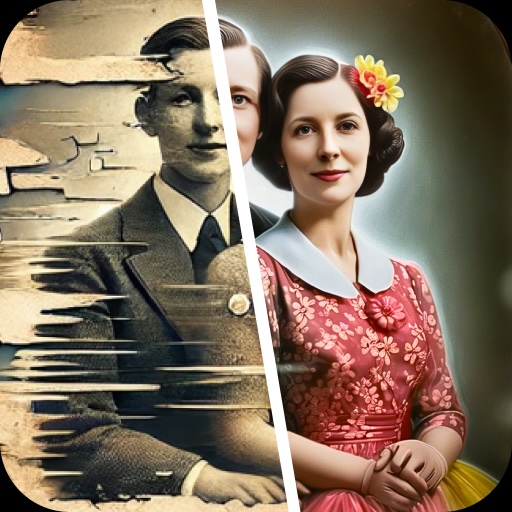

Old photographs hold memories that are impossible to replace. Unfortunately, time can leave these pictures faded, scratched, blurry, or damaged. Renew – Old Photo Restoration is an AI-powered photo editing app designed to help Android users improve old photographs and bring important memories back into focus. Searching for Renew – Old Photo Restoration MOD APK? Before installing a modified application, it is important to understand the original app’s features, what an unofficial APK may change, and how to protect your device and personal photographs.
Renew offers tools for restoring damaged pictures, enhancing facial details, colorizing black-and-white images, and animating photographs. However, the availability of these features, export quality, and subscription requirements may depend on the app version and plan. Modified APK files are not official releases, and their advertised premium benefits cannot be assumed to work.
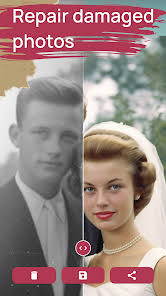
This guide from APKMarty.com explains Renew’s main features, how to install the official Android app, what to consider before downloading an unofficial APK, and how to get better results when restoring treasured pictures.
What Is Renew – Old Photo Restoration?
Renew – Old Photo Restoration is a photography application developed by Olena Dorohan. It uses AI-assisted image processing to help users improve old or damaged pictures without requiring advanced photo-editing skills.
The app is intended for people who want to preserve family photographs, improve faded portraits, repair visible image damage, or add color to historical black-and-white pictures.
Features of Renew Old Photo Restoration
AI-Powered Photo Restoration
The main purpose of Renew is to improve the appearance of old or damaged pictures. Its restoration tools are designed to address common problems such as visible scratches, creases, tears, fading, and reduced clarity. For example, a scanned family portrait with minor surface damage may become easier to view after restoration. The app can also improve the overall appearance of photographs that have lost some sharpness over time.
However, heavily damaged images may still contain imperfections. AI cannot guarantee an exact reconstruction of details that are completely missing from the original photograph.
Face Enhancement and Detail Improvement
Old portraits often suffer from soft facial details, low resolution, or blur caused by ageing and poor scanning. Renew includes image-enhancement capabilities intended to sharpen facial details and improve perceived clarity. This can make portraits more suitable for digital albums, family slideshows, or sharing with relatives.
When using AI face enhancement, compare the original and restored images carefully. Some enhancement systems generate plausible facial details that may not match the person’s actual appearance. For historical portraits, a natural-looking result is often more valuable than an aggressively sharpened image.
Black-and-White Photo Colorization
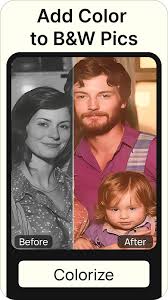
Colorization is another feature associated with Renew. It can add estimated colors to black-and-white photographs, giving users a different way to experience older memories. A monochrome photograph of a family gathering, for instance, may receive colors for clothing, skin tones, backgrounds, and other visible elements.
These colors are AI-generated estimates, not necessarily historically accurate representations. The original image usually does not contain enough information to determine every object’s true color. If authenticity matters, preserve the original monochrome version alongside the colorized result.
Repairing Scratches and Visible Damage
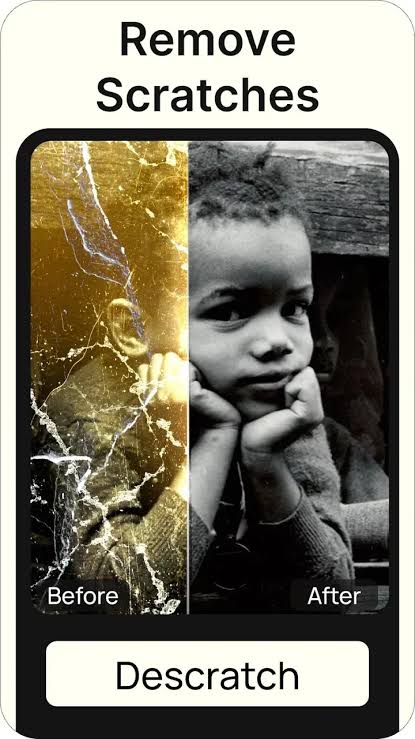
Printed photographs can develop scratches, folds, stains, and other marks from handling or improper storage. Renew’s restoration features are designed to improve damaged images and reduce the visual impact of some imperfections. Results may be particularly useful when the damage is limited, and the surrounding image contains enough information for the AI to work with.
For photographs with major tears or missing sections, inspect the result closely. Restoration may improve the overall image without completely repairing every damaged area.
Photo Animation
Renew also advertises a feature that can turn selected photographs into short animated videos. This can give a static portrait a more dynamic presentation for personal projects or sharing with family members. However, animation introduces AI-generated movement, which should not be confused with authentic footage of the person.
Use this feature thoughtfully, especially when working with photographs of deceased relatives or other sensitive personal subjects.
HD Image Export
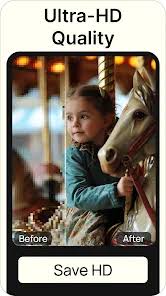
Renew supports saving restored photographs in high definition, according to its official listing. Higher-resolution exports can be helpful when preparing images for digital albums, presentations, or printing.
The actual export options available to you may depend on your app version, subscription, and settings. Check the export screen before assuming that every resolution is included without payment.
Adjustable AI Restoration Strength
The app also describes controls for adjusting restoration strength. This can help users choose how strongly the image should be enhanced.
A lower setting may preserve more of the original photograph’s appearance, while a stronger setting may create a more noticeable transformation. The best choice depends on the photograph’s condition and the result you want.
How to Download Renew on Android
For the most straightforward installation, use the official Google Play listing rather than an unknown modified package.
- Visit the official Play Store.
- Confirm the app name and developer, Olena Dorohan.
- Check any in-app purchases, subscriptions, or trial conditions before proceeding.
- Tap Install if it is available for your device and region.
- Open Renew: Launch the application and review the permissions it requests.
- Select an image you want to improve.
- Choose the appropriate enhancement or restoration tool.
- Compare the restored image with the original before saving.
- Export your image: Select an available output option and save a copy.
The official app is the recommended starting point because its source and developer listing are identifiable. Availability, features, and pricing can change over time.
Safety and Privacy: Protect Your Photos
Old photographs can contain sensitive family details, identifiable faces, personal documents, and information about people who are no longer alive. Protecting those images should be part of your restoration process.
- Review App Permissions – Grant only the permissions needed for the task. If an image-restoration application requests access that seems unrelated to photo editing, investigate before allowing it.
- Read the Privacy Policy – Check whether the app processes photographs locally or uploads them to a remote service. Also review how images may be stored, retained, or used.
- Keep Original Copies – Save an untouched copy of every important photograph before applying AI restoration. This lets you compare results and return to the original if the AI changes facial details or removes important features.
- Be Careful With Premium Claims – An unofficial APK may advertise free premium features, but those claims do not establish that the application works as described. Avoid providing payment details to unfamiliar websites or entering sensitive information into unverified applications.
- Keep Android Updated – Install operating-system and security updates when available. Use reputable mobile security tools and remove applications that exhibit unexplained pop-ups, excessive permissions, or other suspicious activity.
Tips for Getting Better Photo Restoration Results
Even a capable AI tool works best when the source image is prepared properly.
I. Start with the clearest available photograph. If possible, scan a physical print rather than photographing it under poor lighting. A clean, high-resolution source gives the restoration tool more visible information.
II. Avoid reflections and shadows. When photographing a print, use even lighting and keep the camera aligned with the picture. Reflections can hide details and confuse enhancement tools.
III. Try moderate restoration settings first. Strong processing can make skin appear artificial or change small details. Increase the strength gradually and compare each result.
IV. Preserve the original colors when accuracy matters. AI colorization is useful for visualization, but it cannot reliably determine the true colors of every object in a historical photograph.
V. Inspect faces carefully. Check eyes, teeth, hairlines, and other identifying features. If the restored face looks noticeably different, try a gentler setting.
VI. Save multiple versions. Keep the original, a lightly restored version, and any stronger enhancement separately. This makes it easier to choose the best result later.
VII. Back up important images. Store copies in a secure location, such as an external drive or a trusted cloud service, especially when restoring irreplaceable family memories.
Conclusion
Renew – Old Photo Restoration MOD APK is a search term for users interested in AI-powered photo restoration and potentially modified app features. Renew itself offers useful tools for improving old photographs, enhancing faces, colorizing monochrome images, animating portraits, and exporting restored pictures.
However, the benefits advertised for unofficial MOD APK files are not verified simply because a download page promises them. Unknown packages can expose your device and personal photographs to unnecessary risks.
APKMarty.com recommends prioritizing image quality, privacy, and device security over unverified premium-unlock claims.
FAQs
Can Renew restore damaged old photographs?
Renew includes AI-assisted restoration tools designed to improve scratches, creases, fading, and image clarity. Results depend on the source photograph’s quality and the extent of the damage.
Can Renew colorize black-and-white pictures?
Yes. Colorization is one of the features described in the official app listing. The AI estimates suitable colors, but the results may not reflect the photograph’s historically accurate colors.
Does Renew support HD photo saving?
The official listing describes high-definition image exports. Available resolution options and any restrictions may vary by version or subscription, so check the export settings before purchasing a plan.
Can Renew make old photographs move?
Renew advertises a photo-animation feature that converts selected still images into short videos. The resulting movement is AI-generated and should not be treated as authentic historical footage.
Will Renew restore every detail of a badly damaged photo?
No. Restoration tools can improve visible details, but they cannot guarantee an exact recovery of missing information. Keep the original image and review the output for inaccurate facial features or invented details.















Review & Discussion