

Screen recording has become an essential tool for mobile gamers, online educators, app reviewers, and everyday Android users. Whether you want to capture an impressive gaming moment, create a tutorial, demonstrate an application, or save a recording of your own on-screen activity, a reliable screen recorder can make the process easier. Screen Recorder – XRecorder MOD APK is a popular search term for people looking for XRecorder’s screen-capture features alongside modifications that may claim to unlock additional functionality.
Before installing a modified version, however, it is important to understand what the original app offers, which features depend on your device, and what security risks may come with unofficial APK files. At APKMarty.com, our goal is to help readers make informed Android app choices. This guide explains XRecorder’s main features, recording workflow, editing capabilities, installation considerations, and practical safety checks.
It also distinguishes features documented by the official developer from claims that cannot be verified for every MOD APK.
What Is Screen Recorder – XRecorder MOD APK?
XRecorder is an Android application designed to capture screen activity as video, take screenshots, and perform basic video edits. It is useful for creating gameplay clips, walkthroughs, educational demonstrations, app tutorials, and other screen-based content. The term XRecorder MOD APK generally refers to an unofficially modified Android installation package. Depending on who modified it, such a package may claim to unlock paid features, reduce advertisements, or change certain app settings.
These claims should not be treated as verified facts. There is no single guaranteed feature set for every modified build, and an unofficial package may be outdated, altered in unexpected ways, or unsafe. For most users, the official release is the best starting point because it provides a more reliable route to updates and the developer’s published app information.
Features Of Screen Recorder – XRecorder
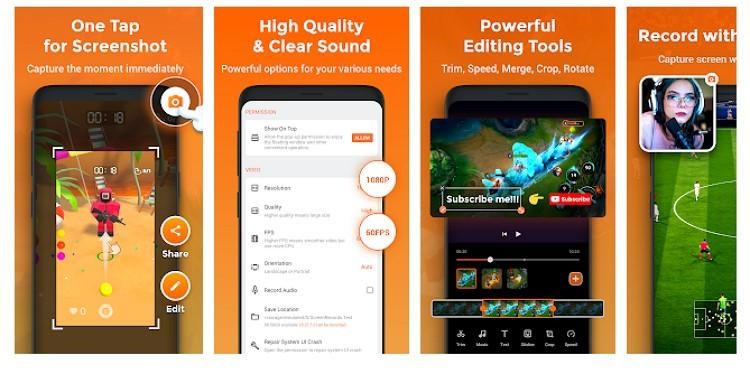
The following features are documented for the original XRecorder app. Availability can depend on the Android version, device hardware, app version, and the feature’s own requirements. They should not be assumed to work identically in every MOD APK.
HD Screen Recording
XRecorder offers adjustable recording settings for users who want to capture clear videos. Its published listing describes resolutions from 240p to 1080p, frame rates from 15 to 60 FPS, and a bitrate setting of up to 12 Mbps for the specified recording modes. Other versions or device configurations may advertise additional options.
Recording at maximum quality does not guarantee a perfect result. The phone’s processing power, available storage, temperature, and the original content can all affect performance.
Internal Audio and Microphone Recording
Audio is an important part of tutorials, game videos, and app demonstrations. XRecorder’s listing describes internal audio recording on Android 10 and above, alongside sound recording for supported workflows.
However, audio capture is not universal. Android restrictions, the target app, microphone access, and device-specific behavior can prevent some sounds from being recorded. Protected content may also block capture.
Before recording something important, make a short test clip and check both the picture and sound.
Gameplay Recording for Mobile Gamers
XRecorder can help gamers save matches, highlight moments, walkthroughs, and demonstrations without needing a separate camera. A practical workflow is to choose a suitable resolution, test audio, begin recording before the important moment, and review the resulting clip afterward.
For creators, the recorded footage can become part of a longer video or a short social media post. Keeping the recording focused on the relevant action usually makes the final result more engaging. Remember that high-resolution recording can increase heat, battery use, and storage consumption, particularly during long gaming sessions.
Facecam and Reaction Videos
Facecam recording allows creators to combine screen content with a camera view of their reactions. XRecorder’s published listing describes a movable facecam overlay, with positioning and size adjustments available in supported versions.
Before recording, check that the camera preview does not cover important interface elements. Good lighting, clear speech, and a clean background can also improve the result.
Built-in Video Editing
Recording is only one stage of video production. XRecorder also describes editing tools for trimming clips, removing unwanted middle sections, merging recordings, and adjusting playback speed. Additional tools listed by the developer include music, stickers, text, cropping, and other editing options in supported versions.
Screenshots and Floating Controls
XRecorder also supports screenshots and floating recording controls. These can make it easier to start or stop a capture without repeatedly navigating through menus.
Screenshots are useful for instructions, troubleshooting guides, and app reviews. Floating controls can help you avoid including unnecessary navigation in the final recording.
The precise appearance and behavior of these controls can vary by version and device settings.
No-Root Recording and Flexible Storage
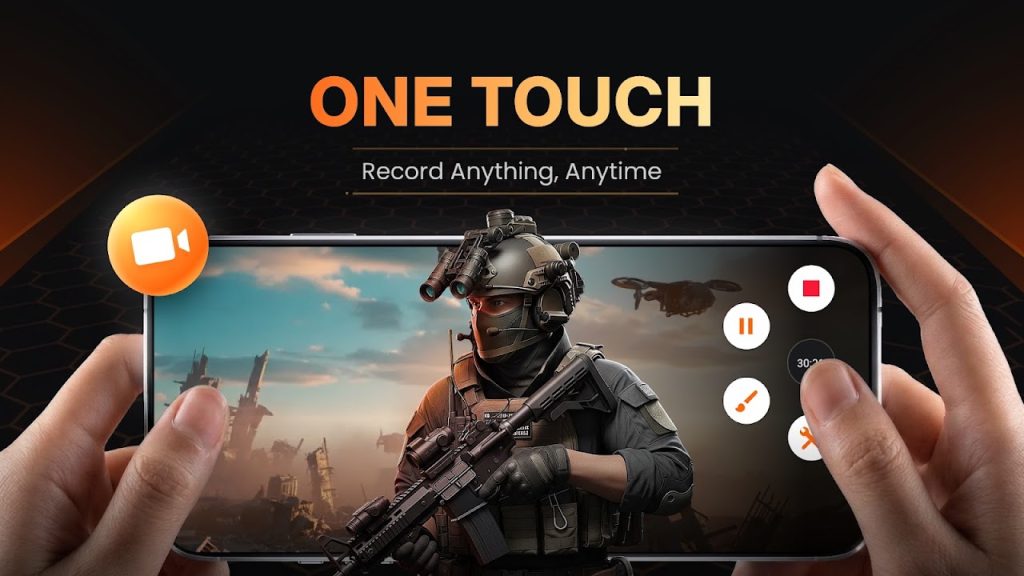
The official listing advertises screen recording without rooting the Android device. It also describes options for saving recordings to internal storage or an SD card where supported.
Avoid rooting your phone simply to install a screen recorder. Root access changes the device’s security model and is not normally required for standard screen-capture workflows.
Storage flexibility is useful for people who record frequently, but an SD card must have sufficient space and suitable performance for the chosen video quality.
Screen Recorder – XRecorder MOD APK Download and Installation Guide
People searching for XRecorder MOD APK may be looking for premium features or fewer interruptions. Before choosing an installation source, consider the difference between the official release and an unofficial modified package.
Recommended Option: Official XRecorder APK
The simplest option for most Android users is to install XRecorder from its official Google Play listing. This gives you the store-distributed app and access to updates offered through that channel.
If You Are Considering a Modified APK
There is no verified MOD APK download link or independently confirmed safe build provided in this article. APKMarty.com should not label an unverified package as safe or promise that a modified version unlocks specific features without evidence.
If you encounter an unofficial APK, keep these points in mind:
- Verify who provides the file and whether the source is trustworthy.
- Check the app’s requested permissions and whether they make sense for screen recording.
- Scan the file using reputable security tools before opening it.
- Keep Google Play Protect enabled and heed any warnings.
- Avoid installers that request unrelated access, demand payment through suspicious prompts, or instruct you to disable device security.
- Never enter passwords, payment details, or sensitive account information into an app you do not trust.
Google explains that Play Protect checks apps, including apps from outside Google Play, and can warn about or remove harmful software. A clean scan is helpful but does not guarantee that an app is completely safe.
Conclusion
Screen Recorder – XRecorder is a practical option for Android users who want to capture gameplay, create tutorials, record demonstrations, and make basic edits without switching between multiple applications. Its official feature set includes adjustable video quality, supported audio recording, screenshots, floating controls, and built-in editing tools.
Although searches for XRecorder MOD APK often reflect interest in additional features or fewer advertisements, modified packages can introduce security, privacy, compatibility, and update risks. Claims about unlocked premium functions should not be accepted without reliable evidence.
For most users, the official XRecorder release offers the more dependable starting point. Test recording quality and audio before an important session, review permissions, and keep your device security protections enabled.
FAQs
Can I record gameplay with XRecorder?
Yes. Gameplay recording is a documented feature of the official app. You can configure supported recording-quality settings and capture gameplay for tutorials, highlights, or personal review.
Does XRecorder support internal audio?
The official listing describes internal audio recording on Android 10 and above. Actual results depend on the device, Android restrictions, and the application being recorded.
Does XRecorder add a watermark?
The official app advertises watermark-free recording. Availability and conditions can differ across versions and features, so verify the current official listing and test an export. Do not assume every unofficial build behaves the same way.
Do I need root access to use XRecorder?
No. The official app advertises recording without root access. Rooting a device is not normally necessary for standard screen recording.
Can I edit videos inside XRecorder?
Yes. The official app lists tools such as trimming, merging, removing sections, and adjusting playback speed. Other editing options may be available depending on the app version.














Review & Discussion